
How to Find Your FMLA Fax Number
FMLA Fax Number: Where to Send Your Certification
If you're looking for an FMLA fax number, the first thing to know is that there isn't one number that works for everyone. Where you send your FMLA paperwork depends on your employer and how they manage leave requests.
Some employers handle FMLA paperwork through HR, while others use a third-party leave administrator. This guide explains how to find the right FMLA fax number, where to send your forms, and how to fax your FMLA paperwork online with Faxaroo without needing a fax machine.
What is FMLA?
The Family and Medical Leave Act (FMLA) gives eligible employees job-protected leave for certain medical and family reasons. You may need to fax FMLA forms or medical certifications to your employer or leave administrator to support your request.
How the FMLA Certification Process Works
Your employer will tell you which forms you need and where to send them. The Department of Labor explains the leave process, but it typically looks like this:
Receive your FMLA paperwork: Your employer provides information about your FMLA rights and any required certification. Employers may use Form WH-381 or Notice of Eligibility and Rights & Responsibilities for this step.
Complete the correct form: This may include Form WH-380-E for your own serious health condition or Form WH-380-F for family member’s serious health condition.
Have your health care provider complete their section: Make sure all required information is included.
Submit the certification: Fax or mail it using the contact details provided by your employer or leave administrator. The DOL specifically states that completed certification forms should not be sent to the Wage and Hour Division.
Keep a copy: Save your completed forms and your fax confirmation.
For other types of FMLA leave, including military family leave, you can find the full selection on the Department of Labor's FMLA forms page. The page includes WH-384, WH-385, and WH-385V in addition to the medical certification forms.
Find the Right FMLA Fax Number First
Before sending your FMLA forms, confirm the fax number provided for your employer or leave request. You can usually find it in:
Your FMLA paperwork: Check the certification form or leave notice you received.
Your HR portal: Look under FMLA, leave, or employee benefits.
Your benefits handbook: Submission details may be listed there.
Your HR department: Ask HR if you cannot find the correct number.
Your leave administrator: If your employer uses a third party such as Sedgwick, Unum, MetLife, Lincoln Financial, or The Hartford, follow the fax instructions provided for your claim.
Fax Numbers for Major FMLA Leave Administrators
| Leave Administrator | Fax Number | What the Number is For |
| MetLife | 1-800-230-9531 | FMLA certifications |
| The Hartford | 833-357-5153 | FMLA certification forms / leave documentation |
| Unum | 800-447-2498 | Claims information and completed claim forms |
| Lincoln Financial | 877-843-3950 | Employer-sponsored benefits claims |
This list covers some major leave administrators, but there are others. Always verify the number before sending, as fax details can vary between employers and leave requests.
What is the USPS FMLA Fax Number?
There isn't one USPS FMLA fax number for every employee. USPS employees submit required FMLA documentation to the FMLA Office at the Human Resources Shared Services Center (HRSSC).
Check your current FMLA paperwork for the correct submission details before sending. You can also refer to the NALC's FMLA resources for information about the USPS FMLA process.
Sending FMLA Medical Records and Certifications Securely
FMLA certifications can contain sensitive medical information, so take a few precautions when sending them:
Use the correct fax number: Send documents only to the HR department or leave administrator specified in your FMLA instructions.
Consider a cover sheet: Adding a fax cover sheet and marking it as confidential can help identify the documents as sensitive medical information.
Keep your records: Save a copy of your forms and proof that they were sent.
Employers are also required to maintain FMLA medical records separately from regular personnel files and treat them as confidential.
Sending Your Certification Without a Fax Machine
Most people don't have fax machine access at home or in a break room anymore. Faxaroo lets you send a completed WH-380 certification from a phone, tablet, or computer with no subscription and no monthly plan, so a one-time document like an FMLA certification doesn't require signing up for something you'll use once.
How to Fax Your FMLA Certification with Faxaroo in 3 Easy Steps!
Once you've found the correct FMLA fax number, Faxaroo lets you send your documents from a browser, no fax machine or dedicated phone line required.
1. Upload your fax document to our secure web portal by selecting the document from your device or using our easy drop and drag feature. Faxaroo supports PDF, PNG, GIF and JPEG – so you can easily take a photo of the document using your mobile phone and upload it to Faxaroo within seconds!
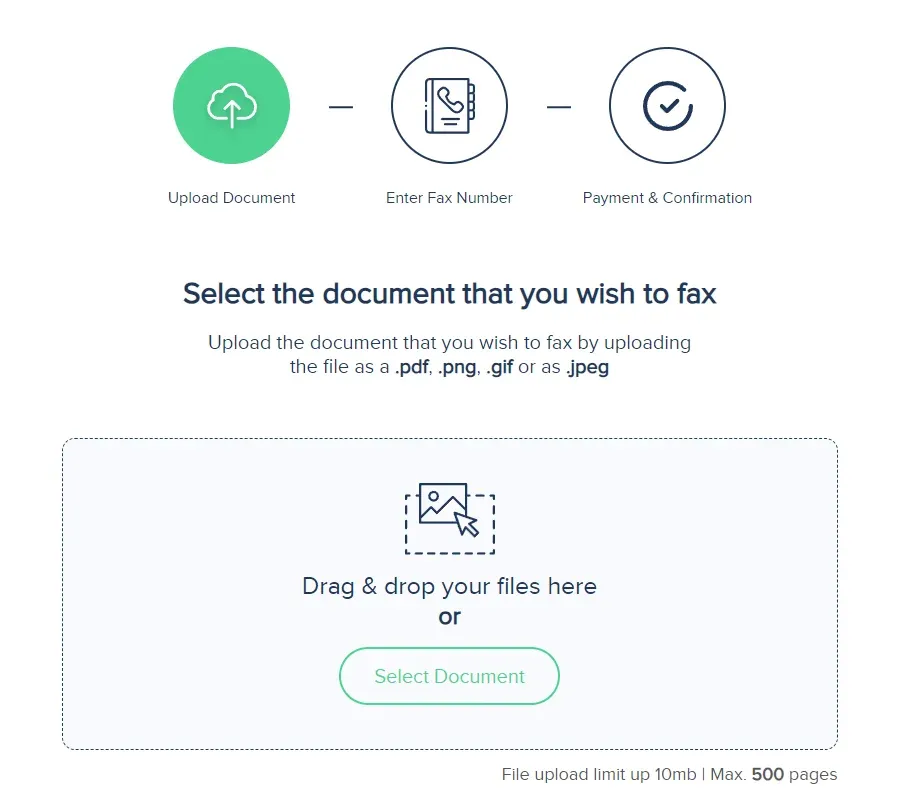
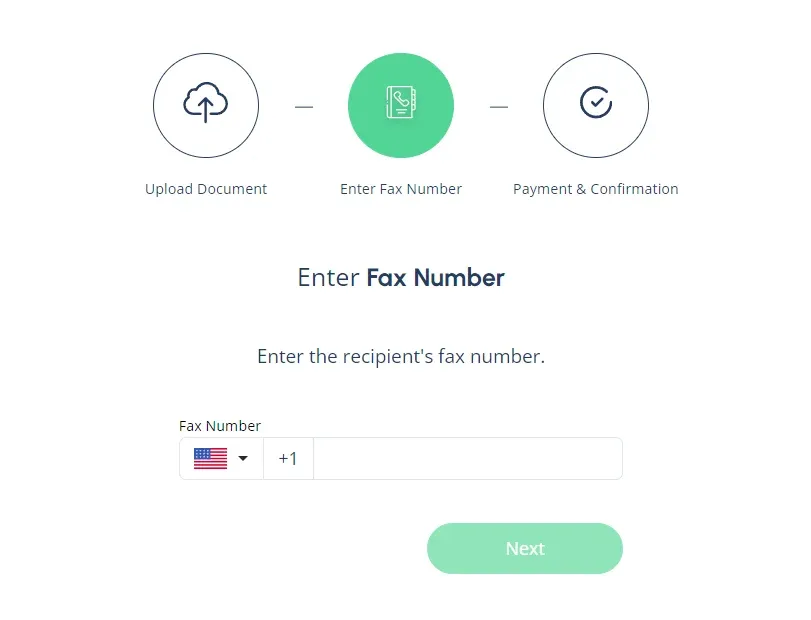
2. Enter the fax number. Be sure to include the area code followed by the fax number.
3. Select your payment method. Once you’ve entered the fax number, the final step is to confirm payment. Faxaroo accepts payment via Visa or Mastercard.
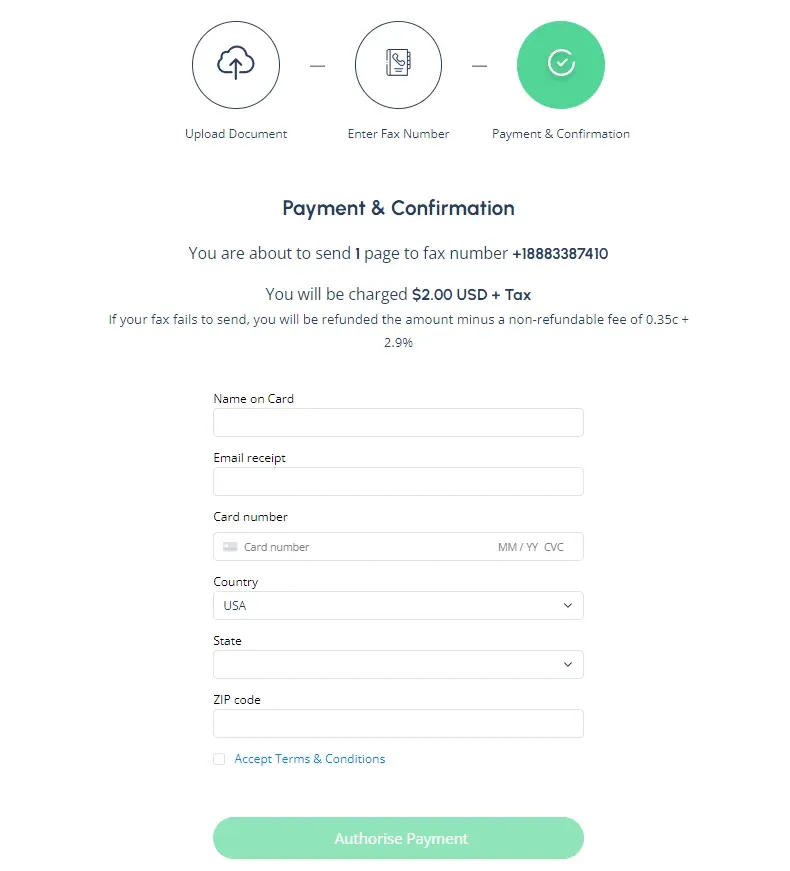
Once you’ve entered your payment details, hit send and we’ll take care of the rest!
Why Faxaroo Is the Best Choice for Faxing FMLA Paperwork
Here's why many users choose Faxaroo:
No sign up required: Makes faxing fast, no logins and passwords required - users don't have to remember yet another login.
Pay as you go: No subscriptions, meaning users aren’t required to pay monthly fees or worry about canceling after sending just one fax.
Security: Your documents are handled with care and confidentiality. Faxaroo is ISO 27001 certified, encrypted and processed via TLS encryption for ultimate security.
Accessibility: Faxaroo is compatible with all devices - smart phones, tablets, and computers, allowing you to send faxes fast while on the go. It's also a 24 hour fax service which means you can send a fax anytime, day or night, without needing a physical fax machine.
Environmentally Friendly: Reduce paper waste with Faxaroo's digital faxing, contributing to a greener planet.
Reliability: Faxaroo provides instant fax confirmation of fax delivery via email, giving you peace of mind that your documents have reached their destination.
Low-cost fax: With Faxaroo, there are no hidden fees. You only pay for the pages you send.
Compatibility: Faxaroo supports multiple file formats including PDF, PNG, GIF, JPEG.
Global Reach: Send faxes internationally to destinations like Australia, Canada, Japan, and Germany.
Send as many pages as you need: User can send a large fax (Up to 500 number of pages). Most free fax options restrict sending to a few pages per day or make users upgrade plans to send more.
Fax Your FMLA Certification with Faxaroo!
Once your FMLA forms are complete and you have the correct fax number, you can fax from home using a phone, tablet, or computer with Faxaroo. Simply upload your documents, enter the fax number provided by your employer or leave administrator, and send. You’ll receive an email confirmation of your fax delivery, so you have a record that your paperwork was sent.
The Best Way to Fax? Why Choose Faxaroo

Secure & Reliable
Faxaroo takes data protection seriously, with its ISO 27001 certification. All faxes are encrypted and processed via TLS encryption. Faxes are automatically deleted once they’ve been sent.

Pay Per Fax Page
Faxaroo works on a pay-as-you-go basis, meaning you can send faxes whenever you need to without being stuck on a monthly plan. If you only need to fax one-time, Faxaroo is a great, no-strings-attached option.

Easiest Way To fax
No sign-up required - only pay for the fax pages you send. It’s as easy as uploading your fax document to our fax platform and we’ll handle the rest.



 Fax from phone, computer or tablet
 Secure & reliable online faxing
 Cost effective, pay per pages sent
 Easy to use, self-service fax platform
 No plans or contracts, pay-as-you-go





 United States
  Australia
  Germany